
Agent Status
Documentation in progress
Some sections are still incomplete.
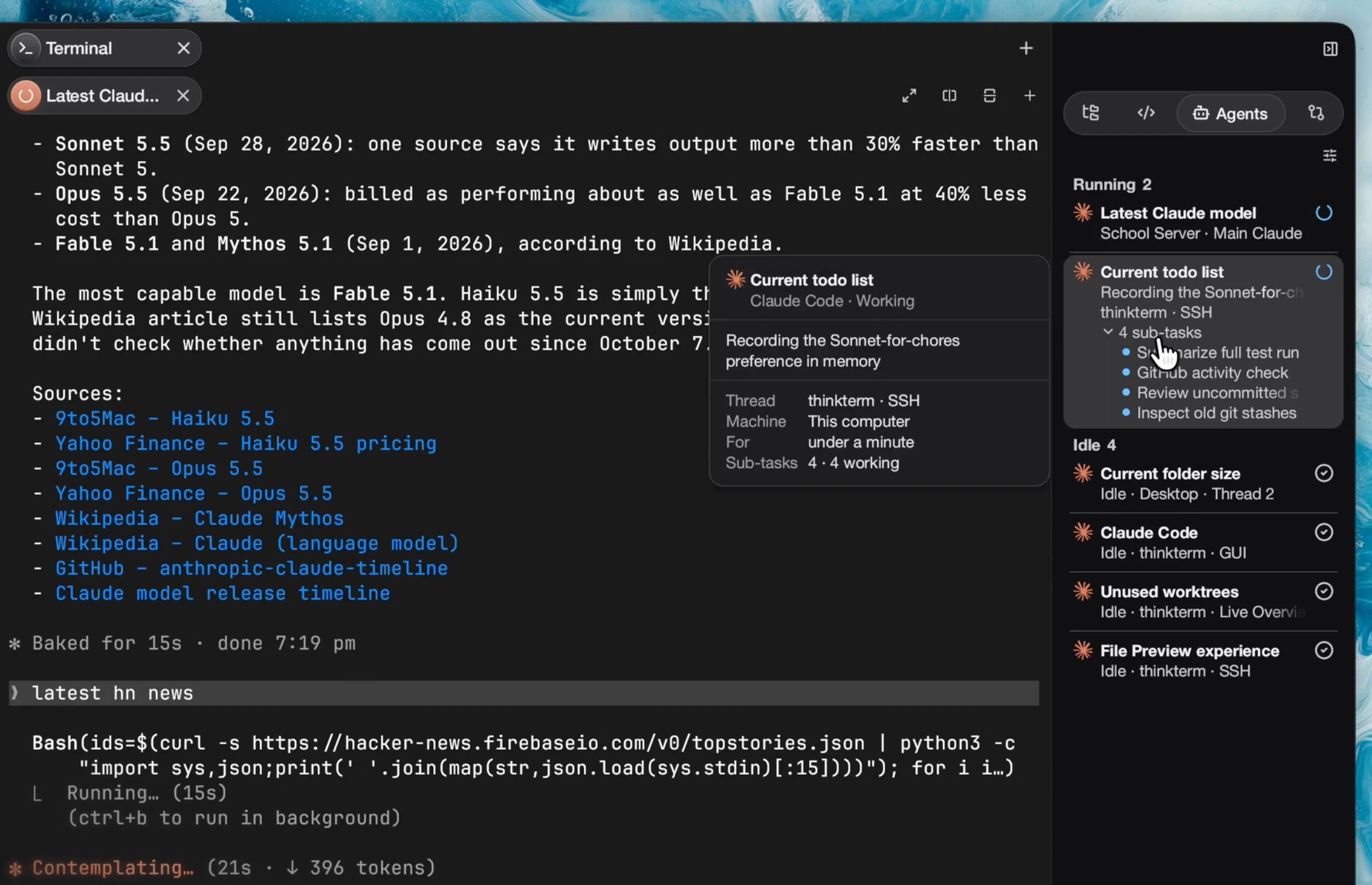
A Thread running a long task carries a live state, so you can tell at a glance which sessions need you without visiting each one. When a Thread finishes a stretch of work, or starts waiting for a decision, a short sound plays.
The states are working, blocked (waiting on a user decision), and idle, plus error for a program that reports it stopped on one. A session ThinkTerm cannot classify is simply unmarked.
Detection is on by default and can be switched off in Settings › Sidebar & Plugins, where the Agents panel and the detector share one switch. agent_status_detection = false in the config file turns it off as well, and a mux server, which has no Settings window, follows that option alone. With it off, only the native escape sequences described below are read. Detection runs where the pane lives, so switching it off on a mux server and on the client in front of you are two separate acts.
Supported agents
These are the agents ThinkTerm knows by name. An agent that sends status reports tells ThinkTerm its state itself, and the report decides it outright; screen rules are what ThinkTerm reads for one that sends none. Detecting them needs nothing installed into any of them — no hook, no plugin, no wrapper script — and none of them has to be configured. Separately, and only if you run it, thinkterm skill setup adds a skill and a session-start hook to Claude Code and Codex so they can use the other panes; see Command Line.
| Agent | Found on PATH as | How it is covered |
|---|---|---|
| Claude Code | claude | Status reports, from version 2.1.295; screen rules for an older one |
| Codex | codex | Status reports, from version 0.163.0; screen rules for an older one |
| Copilot CLI | copilot | Screen rules |
| Cursor Agent | cursor-agent or cursor | Screen rules |
| Pi | pi | Status reports, from version 1.1.0; screen rules for an older one |
| OpenCode | opencode | Screen rules |
| Kimi Code | kimi | Screen rules |
| Soul | soul | Reports its own state through THINKTERM_AGENT |
| OMP | omp | Listed, but not detected yet: it runs normally, its state just is not shown |
Claude Code asks the terminal whether it understands status reports when it starts, and ThinkTerm answers, so nothing has to be set up. It sends none inside tmux, in one of its own background sessions, or with CLAUDE_CODE_DISABLE_TERMINAL_TITLE=1; screen rules then cover it as before. Codex sends them from 0.163.0 whenever its output is a terminal, without asking first. Pi sends them from 1.1.0, and PI_PROGRAM_STATUS=1 or 0 forces it on or off. Where screen rules apply, they read the bottom of the pane's live screen and its terminal title, and recognise working, waiting for your input, or idle. Any other program can join the list by reporting its own state, or by having a rule file written for it.
Settings › Agents lists the same agents under Integrations, each with its mark and a line saying how it is covered. For the screen-rule agents that line also says whether the command was found on your PATH; ThinkTerm looks in your login shell's PATH as well as its own, plus the usual install folders. That is a hint for you, not a condition: detection recognises the running program whether or not the check found it. Clicking a row opens a short explanation, including the path of the file that would override its rules.
How the state is decided
A program that sends its own status report settles the question for its pane: the report decides the state, and no screen rule is read for that pane while it holds. The report's app names the agent, so a program ThinkTerm has never heard of shows up in the Agents panel under its own name. A report speaks for the program that sent it, and for any program it hands the terminal to, such as a pager or an editor. Once the shell has the terminal back, a report of work in progress ends; a done or error result stays until someone looks at the pane.
For a program that sends no such report, three sources of evidence are consulted, strongest contract first.
1. The THINKTERM_AGENT variable. The program reports its own identity, session and state. This is ThinkTerm's own variable, described below; unlike a screen rule it survives any redesign of the program's interface.
2. Screen rules. TOML manifests matched against the pane's visible output and its terminal title. The bundled rules come from the herdr project.
3. Native escape sequences. OSC 9;4 progress reports and the leading title-spinner marker. This is also all that is used when the feature is switched off.
Two arbitration rules matter, and they point in opposite directions on purpose:
- A live process wins on identity. A foreground process that matches a manifest is the ground truth for what is running now. A reported variable is a message from the past and never overrides it — so a variable left behind by an exited program cannot mislabel whatever runs in that pane next.
- The screen wins on state. Programs commonly miss the "user pressed Esc" and "prompt cancelled" transitions, and both end with the screen visibly idle. A matching screen rule therefore outranks a reported state.
Transitions inferred from the screen — out of blocked, and from working to idle — are debounced by roughly 450 ms, because a half-drawn frame must not replay a notification. States reported through the protocol skip the debounce: an explicit report is not a guess.
In the sidebar
A Thread's row in the sidebar carries one mark for the whole Thread, however many panes it has. The mark is worked out from every pane in the Thread, using the agent state where there is one and the native escape sequences for any other pane:
| Thread | When |
|---|---|
| Needs Attention | Any pane is blocked, or has reported an error through OSC 9;4 or a status report. This wins over everything else. A Thread whose program stopped on an error is marked with a red cross rather than the amber of a wait |
| Running | Any pane is working, or shows a progress report or title spinner |
| Done | The Thread was running and has stopped, and you have not looked at it since |
| Idle | None of these. The row carries no mark |
The sidebar's Done is ThinkTerm's own record, not a reported state: it marks a Thread that went from working to idle while your attention was elsewhere. It lasts until you open the Thread, or type or click in it, and it survives a restart. Threads that need attention or are done are also gathered under the sidebar's Notifications button, across every Space — see Spaces, Projects and Threads.
Resting the pointer on a Thread's row opens a card beside it. It names the Thread and counts its agents, then lists each one that has a state: its mark, its title and its state icon, and under that the state in words with how far it has got, why it waits and what it is doing, where its program said. The card shows as many agents as the window is tall enough for and ends with a line such as 3 more when it must leave some out. In the tab bar, a working agent spins its tab's icon, and one waiting on you, stopped on an error, or holding a result nobody has seen yet puts a dot on the icon's corner. A result counts as seen once the pane is in front of you in a focused window.
The Agents panel
The Agents panel in the right sidebar lists every pane running a recognised agent, in every Space and window, including panes on a server you are connected to. A window's right sidebar opens on it; with the panel turned off, it opens on the first panel still offered.
Each agent is a card. The first line carries the agent's mark, the pane's title — fix the build — and, at the right, an icon for its state: a spinner while it works, an amber alert while it waits on you, a red cross on an error, a green check for a result nobody has seen, a grey check when idle. An agent with no mark of its own, such as Soul or one a rule file added, gets a generic one and its name in front of the title: Soul · fix the build. The second line is where the pane is, my-project · Thread 2. The icon already says the state, so the line carries the state in words only where the icon cannot: Idle, whose check differs from a result's only in colour, and Unknown, which has no icon: Idle · my-project · Thread 2.
For a program that sends status reports, the card also carries what it said: a line above the place on what it is doing, what it finished or why it stopped, with what it waits for — Permission, Question or Sign-in — shown as a small tag in front of it; a progress bar; and its sub-tasks, folded into one line that counts them and opens into the list on a click. An open list gives each sub-task a dot in its state's colour, shows the first five and ends with a line such as 3 more. Settings › Agents › Status Display has a switch for each of the four, all on by default, and the view menu below flips the same ones. They also decide what the Thread's hover card and its notification say. A working description shimmers and an error's is red. A line too long for the card fades at its end instead of wrapping, and a path in a description is cut back to its last folders first, if that makes it fit.
An agent whose pane sits in a linked git worktree on this computer has one more line under the place, with a branch icon: the worktree's folder and the branch checked out there, feature-login · feat/login, or the start of the commit when no branch is. Threads are named after tasks, and several can share a name while their checkouts differ. A repository's own checkout shows nothing, since the Thread already names its Project, and neither does a pane on another machine or inside an ssh session.
The agent in this window's active pane sits on a card lifted a step lighter than the panel, so the list shows where you are.
Grouping and the view menu
Cards are grouped under headings that carry a count, and by default the groups are the states, in the order they need you: Needs Attention, Running, Done, Idle, and Unknown for an agent whose state could not be told. Within a group the cards are sorted by Project and Thread, then by agent, so the list does not reshuffle when you switch Spaces or when an agent changes state.
The button at the top right opens the view menu; its tag reads View Options. The line to its left stays empty unless it has something to say: Detection rules reloaded., or how many files were rejected, for a few seconds after a reload; or No agents detected when the list is empty.
| Entry | What it does |
|---|---|
Show | Ticks the states that are listed: Running, Needs Attention, Done, Idle. The last one still shown cannot be hidden |
Machine | Ticks the machines whose agents are listed: This computer and each server. Offered only while agents run on more than one machine, or one is hidden |
Group by | State (the default), Thread, which uses the Project and Thread as headings and gathers agents with no Thread under Other, or None |
Sort by | Fixed order (the default), by Thread, agent and pane within a group; or Recent activity, which puts whichever agent changed state last first |
Description, Waiting Reason, Progress, Sub-tasks | The four switches of Settings › Agents › Status Display |
Reload Detection Rules | Reloads the screen rules, for when you have added or changed an override. The line beside the button then reports how it went; the reasons for any rejected files are in the log |
The choices are kept and apply to every window. When they hide every agent there is, the panel says Every agent is hidden by the view options. Switching detection off, in either place, takes the panel out of the sidebar.
Clicking a card takes you to that pane. A pane in this window has its tab and the pane selected. Otherwise ThinkTerm opens the pane's Thread with the pane selected: here, when the Thread belongs to this window's Space; in the window that has its Space open, brought to the front; or, when no window has that Space open, in this window, which switches to that Space.
Resting the pointer on a card opens another beside the panel, with what the card has no room for: the title and the whole description, wrapped; the agent and its state; the progress and what it waits for; and then Thread, Machine, For — how long it has been in this state — and Sub-tasks. Hover cards, like the tags on buttons, appear after a short pause, at once when another was just showing, and go away on a click, a key press or when the pointer leaves the window.
Sounds and notifications
Two bundled sounds mark the two moments worth hearing about: one when a Thread finishes, and another when it starts waiting on you. Settings › Workspaces › Notification Sounds turns them off; they are on by default.
- Finished plays when a Thread goes from working to idle, and only if the work lasted at least five seconds, so a quick command does not ring.
- Waiting plays when a pane starts waiting for a decision, once for each time it starts waiting. Another pane in the same Thread starting to wait rings again; typing an answer into the question does not.
The sounds follow the same states as the sidebar, so they ring for any program reporting progress, not only for agents. They also ring for the Thread you are looking at: a long task finishing in front of you still plays.
Setting the environment variable THINKTERM_DISABLE_SOUND before ThinkTerm starts silences every sound whatever the setting says, which is useful on a machine you are presenting from. On Linux the sound is played through paplay or pw-play, and a system with neither stays silent. A browser connected to ThinkTerm and the terminal interface play no sounds.
Settings › Workspaces › System Notifications, on by default, also tells the system when a Thread finishes, waits on you or stops on an error — but only while ThinkTerm is in the background, and at most once every 30 seconds per Thread. The notification names the Thread and its state, and carries what its most pressing program said, if anything. Privacy and Security covers what that means for what shows on your screen. THINKTERM_DISABLE_SOUND silences these as well.
Clicking one of these notifications brings the Thread up — in the window already showing it, or otherwise in the window you used last, which switches to the Thread's Space — on macOS, Windows and Linux desktops that follow the freedesktop notification standard. A desktop notification a program raises itself, such as a build reporting it is done, brings up its pane the same way.
Reporting state from your own program
There are two ways. Prefer a status report: it is an open protocol that other terminals read too, it carries an error state, a reason, progress and sub-tasks, and it outranks every screen rule. The THINKTERM_AGENT variable is ThinkTerm's own, carries only the three basic states, and a screen rule can overrule it.
Status reports (OSC 7501)
Status reports follow OSC 7501 (Program Status Protocol). Claude Code sends them from 2.1.295, Codex from 0.163.0 and Pi from 1.1.0. Write one sequence whenever something changes; it may end with ESC \ or with BEL:
ESC ] 7501 ; state=<state>[:id=<path>][:kind=<kind>][:progress=<0-100>][:app=<name>][:title=<base64>][:msg=<base64>] ESC \From a shell:
msg=$(printf %s 'Running the test suite' | base64 | tr -d '\n')
printf '\033]7501;state=working:app=my-agent:progress=40:msg=%s\033\\' "$msg"| Key | Meaning |
|---|---|
state | Required. working, blocked, idle, done (finished, with a result nobody has looked at yet), error (failed and stopped), or clear, which removes the record and everything under it |
id | Which record the report is for. Left out, it is the program's own record; a /-separated path such as build/test files a sub-task under it. Up to 8 segments and 128 bytes |
kind | With blocked only: permission, question or auth |
progress | With working or blocked only: 0 to 100. Left out, progress is indeterminate |
app | A short name for the program, such as claude-code |
title | A heading, base64-encoded UTF-8 |
msg | One line on what the program is doing or did, base64-encoded UTF-8 |
Names in id and app use letters, digits and _ . + -, at most 32 characters each. title may decode to 192 bytes and msg to 2048, neither may hold a control character, and the whole sequence may be at most 4096 bytes. A report that breaks any of these is dropped whole. Each report replaces its record entirely, so a key left out is removed rather than kept from before. Unknown keys are ignored, which is how the protocol grows. The terminal keeps up to 256 records per pane, dropping the one updated longest ago.
To ask whether the terminal understands status reports, send ESC ] 7501 ; ? ESC \ followed by ESC [ c. A terminal that does answers the first with the same sequence; if the answer to ESC [ c arrives first, it does not, and there is no point sending reports.
No report has to be repeated to stay alive. A report of work in progress, working or blocked, ends when your program exits or the shell's next prompt starts; done and error stay until someone looks. So report idle when the user interrupts or cancels, and done or error just before exiting.
When only sub-tasks are left, the most pressing of them stands in for the program: an error before a wait, before work, before a result.
Reporting with THINKTERM_AGENT
Write one escape sequence to your terminal whenever your state changes:
ESC ] 1337 ; SetUserVar=THINKTERM_AGENT=<base64(value)> BELFrom a shell:
v="v1;agent=my-agent;state=working;session=$SESSION_ID;ts=$(date +%s)"
printf '\033]1337;SetUserVar=THINKTERM_AGENT=%s\007' \
  "$(printf %s "$v" | base64 | tr -d '\n')"
The sequence renders nothing and moves no cursor, so it is safe to interleave with full-screen output. It works over SSH and over ThinkTerm multiplexer domains — whichever terminal owns the pty parses it, and the value is mirrored across mux connections.
Value grammar, version 1
v1;agent=<id>;state=<working|idle|blocked>[;session=<id>][;pid=<n>][;ts=<unix-seconds>][;ended=1]| Field | Meaning |
|---|---|
v1 | Grammar version. A minor version such as v1.1 is read as version 1; any other version is ignored entirely |
agent | Required. A short stable identifier |
state | Required. working, idle or blocked. Anything else is treated as unknown and drives nothing |
session | Your own session id, reserved for session restore. May be empty |
pid | Accepted for forward compatibility; currently ignored |
ts | Emission time in unix seconds. See below |
ended=1 | The session is over |
Unknown keys are ignored, so the grammar can be extended without breaking older readers. A later minor version can add keys this one does not know, and ThinkTerm will still read the fields it does.
The value has size limits: at most 4096 bytes once decoded, with agent at most 128 bytes and session at most 512. A report over any of them clears the value the pane held rather than leaving the previous one standing.
About ts. A non-idle report older than six hours stops counting as authoritative — panes on a server can outlive the sessions that wrote to them — and a timestamp more than five minutes in the future is treated the same way, so a fast clock cannot make a report permanently fresh. On panes where the process can never be observed (SSH, tmux and serial panes) that same six-hour window also retires the reported identity, since it is the only remaining signal that the program may have crashed without saying goodbye. If your session can legitimately sit non-idle for longer — an approval prompt left overnight — re-emit your current state periodically; any re-emission resets the window. Idle reports, and reports with no ts, are trusted indefinitely.
About ended=1. While your process is still the pane's foreground leader the flag is ignored: a live process outranks its own farewell. Once the process exits, the pane stops being classified.
When to send what. working when a turn starts, idle when you are ready for input, blocked the moment you display a prompt that needs an answer, and the appropriate state again when that prompt resolves — including when the user cancels or interrupts. A program that observes all of those transitions itself needs no screen rules at all.
Overriding a screen rule
A bundled manifest can be replaced by dropping your own .toml file into:
~/.config/thinkterm/agent-detection/The id inside the file selects which bundled manifest it replaces; the filename is ignored, though naming it after the id, as Settings › Agents suggests, keeps the folder readable. A file with an id of its own adds a new agent rather than replacing one. A file that cannot be read or does not validate is rejected whole, and the bundled manifest it meant to replace keeps working. Reload the rules from the Agents panel's view menu afterwards.
The folder is read on the machine where detection runs, so panes on a ThinkTerm Connect server follow the files in that server's home folder, not yours, and the panel's Reload Detection Rules reloads the rules on this computer only.
One thing to know when writing rules: the title and progress regions see only what the program actually emitted. Both are empty until a title or progress report arrives, and they are cleared when the pane's program changes. Display fallbacks — a tab title derived from the process name, an assumed absence of progress — never reach the rules, so a rule like regex = ['\S'] on the title cannot match a pane whose program never spoke.
Related
- Spaces, Projects and Threads — the sidebar the Thread states show in, and its Notifications list
- The Window — tab icons, which give way to a spinner while a pane works
- Files and Notes — the other panels of the right sidebar
- Command Line —
cli agent,cli events, and driving one pane from another